
School management
What the office used to write in registers, and copy from one book to the next, is entered once in Shams. The principal sees the whole school whenever it is needed, and each member of the office sees what their role allows.

Daily jobs, made shorter
The same tasks every school office knows, before Shams and with it.
Starting the day
BeforeCalls to class teachers to find out who is absent, and to the accountant to learn who is behind on fees.
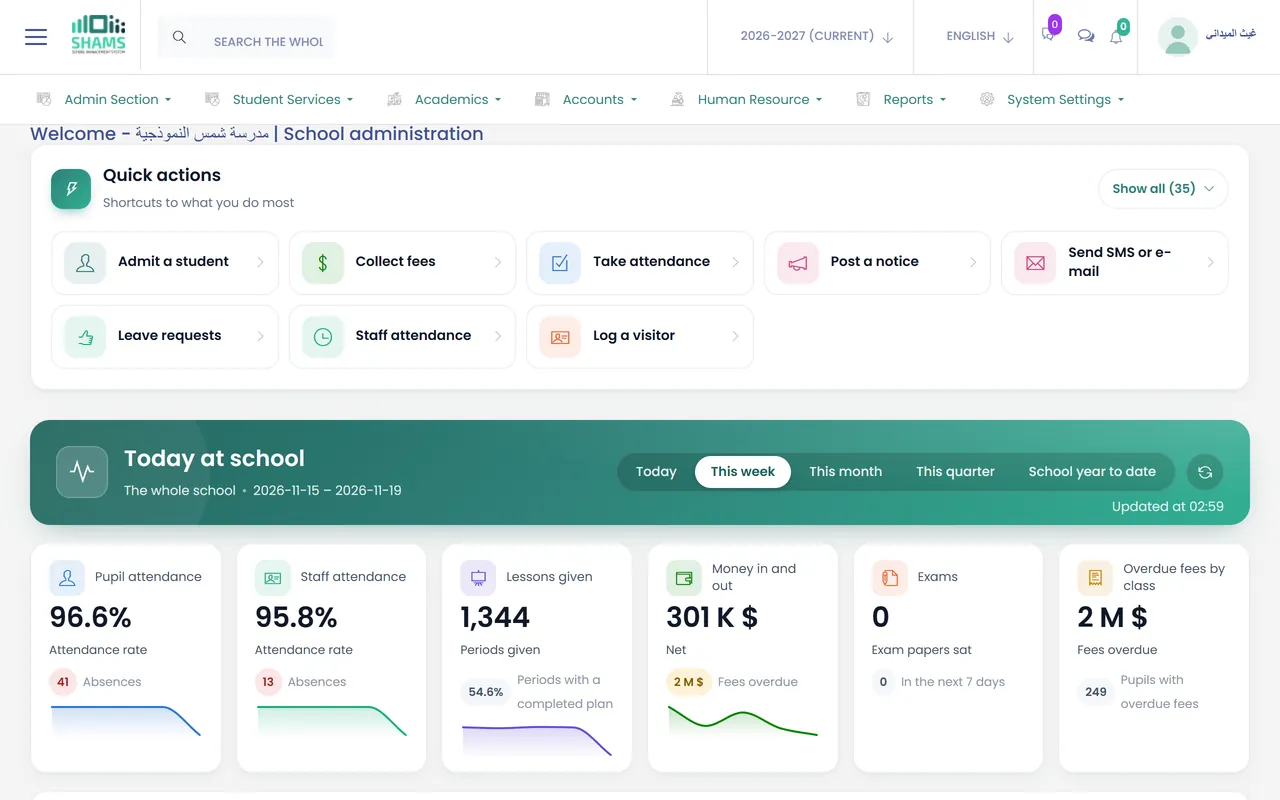
With ShamsOne dashboard shows student and staff attendance, the lessons given, upcoming exams and overdue fees by class.
Enrolling a student
BeforeThe same name written on the enrollment form, the class list, the fee card and the parents' phone list.
With ShamsOne form creates the student's record and the parent's account together. Brothers and sisters share one parent account.
Telling parents about an absence
BeforeSomeone works through the absence list by phone after the first lesson.
With ShamsParents receive a text message about the absence, built from a template the school writes once.
Applications from new families
BeforePaper forms collected at the gate and typed into the records later.
With ShamsParents apply through a form on the school's website. You review it, choose the class and section, and approving it creates the records.
The end of the year
BeforeClass lists rewritten by hand for the new year, and unpaid balances kept in a separate notebook.
With ShamsPromote whole classes in one step, leaving out the students who repeat. The new year starts with classes, sections, subjects and fee groups copied, and unpaid balances move with the student.
Looking up last year
BeforeA search through the archive room for last year's marks and lists.
With ShamsPast years stay open for reading and printing to the staff who hold that permission, and nobody can change them by mistake.
Today at school
The first screen the principal sees brings together what is usually spread between the class teachers, the accountant and the office: student and staff attendance, the lessons given, upcoming exams and overdue fees by class. Switch it between today, this week, this month, this quarter or the year so far.
Above it sit quick actions for what each role does most, such as enrolling a student, collecting a fee, taking attendance or publishing a notice, and one search box finds any student, staff member or screen.
What the office works with
Students and enrollment
- One form for the student's record and the parent's account.
- The student's photo and documents, such as a birth certificate or a previous school's report, kept in the record.
- Extra fields you add to the form yourself, with no programmer.
- Students imported from a spreadsheet, and lists exported to Excel and PDF.
Applications and enquiries
- An application form on the school's website, filled in by parents at home.
- A review queue where you set the class and section, then approve or decline.
- An enquiry register with a follow-up date for each family that calls or visits.
Attendance
- A daily register for each class and section: present, late, absent or on leave.
- Attendance by subject and lesson, kept alongside the daily register.
- A monthly sheet for each section, ready to print.
- Attendance imported from the spreadsheet an attendance device exports.
The academic year
- Two or three terms, as your school runs them, with your own working days, weekend and holidays.
- Promotion of whole classes, with exceptions for students who repeat.
- Past years kept read-only, for reading and printing.
Front desk
- A visitor book: who came, whom they saw, why and when.
- Incoming and outgoing post, with a copy of each letter.
- A phone call log, and complaints with the action taken.
Notices and messages
- Notices for teachers, parents or students, on their dashboards.
- Text messages or e-mails to a class, a section, a role or chosen people, from templates you edit.
- A log of every message: what was sent, to whom and when.
Staff
- A record for each staff member: qualifications, contract and documents.
- Staff attendance, leave balances and the administration's approval.
Cards and certificates
- Student and staff ID cards with the school's logo, printed for a whole section at once.
- Certificate templates, printed for each student.
Roles and reports
- Each role sees only what it is given, and you can create new roles.
- 34 ready-made reports, many of them exported to Excel and PDF.
- A sign-in history: who signed in, when and from which device.
What to ask us in your session
A session is a guided tour with our team. These are good places to start for the principal and the office:
- Show us the Today at school dashboard for a school of our size, for a week and for a term.
- Enroll a student whose brother is already at the school, and show what the parent receives.
- Take an online application from the website through to a student record.
- Walk through the end of the year: promotion, the new year and balances carried forward.
- Suggest the roles we would set up for our office, and show what each one sees.
See Shams with your own school in mind
Book a session with our team. We walk you through Shams on screen, answer your questions and show the parts that matter to your school.