
Teachers
A teacher signs in and finds their timetable, their classes and the work waiting to be marked, then does on screen what used to go into the planning notebook and the marks book. Each teacher sees only their own classes and subjects.

Less paperwork, more teaching
The jobs that fill a teacher's week, before Shams and with it.
Taking the register
BeforeA paper register for each class, added up by hand at the end of the month.
With ShamsMark each student present, late, absent or on leave from a phone between lessons. The monthly sheet is ready to print.
Entering exam marks
BeforeMarks copied from the marks book to a summary sheet, then again onto every report card.
With ShamsEach mark is entered once, against the parts the school defined. Shams adds them up, works out the grade and fills the report card and the class mark sheet.
Homework
BeforeCollecting notebooks to find out who handed in work and who did not.
With ShamsSet homework with a due date, marks and a file. Students upload their answers, you mark them, and a report shows who handed in.
Lesson planning
BeforeA planning notebook checked by hand once a term.
With ShamsUnits and topics sit on the periods of your timetable. Tick what you have taught, and the school sees progress by teacher, class and subject.
Sharing material
BeforePhotocopies, or files passed around in chat groups.
With ShamsUpload summaries and syllabus files for the classes and sections you choose. Students download them from their own accounts.
A quick test
BeforePrinting, marking and recording a short quiz by hand.
With ShamsAn online test drawn from your question bank, with a time limit and automatic marking.
From the phone, between two lessons
The top of a teacher's dashboard holds quick actions for the jobs of the day: take attendance, attendance by subject, set homework, mark homework, your timetable and your lesson plan. Below them, Today at school sums up the day for your own classes and sections.
- Use it in the phone's browser, or in the Shams app for Android.
- Entering a whole section's exam marks is more comfortable on a computer, and works the same way there.
- Teachers do not see students' fees or colleagues' salaries.
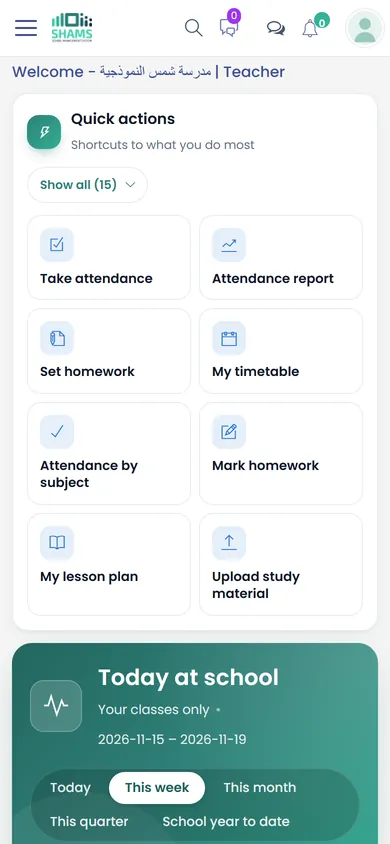
What a teacher finds
The timetable
- Your week and your number of periods, and the timetable of every section you teach.
- The school builds the timetable lesson by lesson, and Shams warns when a teacher is given two periods at the same time.
Attendance by lesson
- A register for each lesson and subject, alongside the daily one.
- Each student's attendance rate in each subject.
Marks
- Exams, parts and weights as the school set them up, for example written, practical and participation.
- Shams does not accept a mark larger than that part's share.
- The report card and the class mark sheet come from the same marks.
- Families see marks only once the school publishes them.
Homework and projects
- Homework for a section with a due date, marks and an attached file.
- Students hand in from their account; you mark and record completion.
- Projects for longer pieces of work, on the same model.
Lesson plans
- Units, topics and page numbers placed on the periods of your timetable.
- Tick each lesson as taught, and follow progress by class and subject.
Material and online tests
- Summaries and syllabus files for the students and parents you choose.
- Online tests from a question bank, timed and marked automatically.
Your own leave and pay
- Request leave, attach a note, and follow the administration's answer.
- See and print your own payslip.
Messages and language
- Chat with colleagues inside Shams, and with parents if the school allows it.
- Work in English or Arabic: each user picks the interface language, on the same data.
What to ask us in your session
Bring a teacher or a head of department along. These show the teacher's side best:
- Open a teacher's dashboard on a phone and take the register from it.
- Set up an exam with our own parts and weights, then enter marks for a section.
- Show what a parent sees before the results are published, and after.
- Set homework with a file, then mark a student's answer.
- Plan a week of lessons on the timetable and follow the progress report.
See Shams with your own school in mind
Book a session with our team. We walk you through Shams on screen, answer your questions and show the parts that matter to your school.