
Parents and students
A parent follows all their children in one account, and sees nobody else's. Each student signs in with an account of their own. The most important news also arrives by ordinary text message, even on a day nobody opens the app.

Closer to the school, without the phone calls
What a parent used to wait for, and what Shams puts in their hand.
An absence
BeforeLearning about missed days at the end of term, from the report card.
With ShamsA text message on the day, and the whole month of attendance in your account.
Marks
BeforeWaiting for the report card to come home.
With ShamsResults appear in your account, subject by subject, as soon as the school publishes them.
Fees
BeforeA trip to the school office to ask what is still owed.
With ShamsWhat is due, paid and remaining for each child. Pay at the office, or upload a photo of a bank transfer slip for the accountant to confirm.
Leave for a child
BeforeA handwritten note sent with the child, and no word back.
With ShamsAsk for leave from your account and see the school's answer there.
Homework
BeforeAsking every evening what was set today.
With ShamsEach child's homework and due dates in your account, and the student hands in the answer from their own.
Every child on one screen
The parent's account opens in any browser or in the Shams app for Android. Each child has a card with their attendance, homework, results, exam timetable, weekly timetable and fees.
- One app for every school: enter your school's address, sign in, and see only what your account allows.
- The school shares the app and the sign-in details with its families.
- On any other phone, a tablet or a computer, the same account works in the browser. About the app.
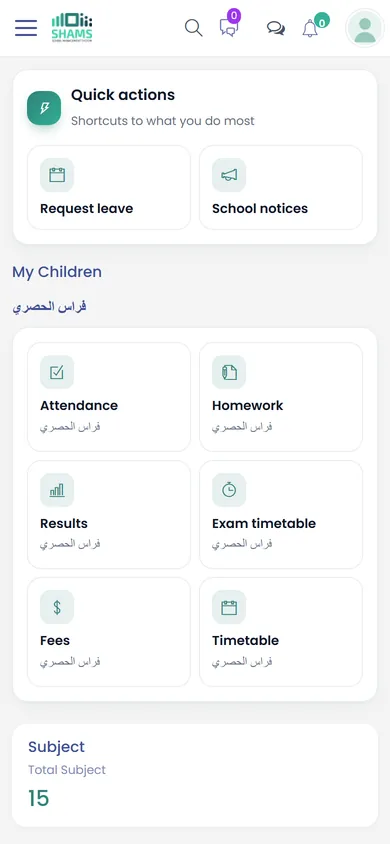
The parent
- Attendance day by day, with a monthly view to print.
- Marks and exam results, once the school publishes them.
- Homework and its due dates.
- Fees: what is due, what is paid and what remains.
- The weekly timetable, the child's teachers and the school bus route.
- Results from previous years for each child, and the school's notices to parents.
The student
- The day's timetable, subjects and teachers.
- Homework, and handing in the answer from their own account.
- Marks once published, and online tests.
- Summaries and syllabus files, the library catalogue and the books on loan.
- Their results from previous years.
- Fees stay with the parent: students see no amounts.
Messages with no app needed
- A text message when a child is absent.
- A text message or e-mail reminder when a fee is overdue.
- Marks by text message, if the school chooses to send them.
Text messages reach any phone, with or without internet.
Sponsors see only what they pay for
Many students have their fees paid by a relative, a charity or a donor. The school links the sponsor's account to the student, and the sponsor then sees that student's fees and what has been paid, just as a parent does.
A sponsor sees no marks and no attendance, and no other student at the school.
Who sees what
| Account | Attendance and marks | Fees |
|---|---|---|
| Parent | Their own children | Their own children |
| Sponsor | No | The students they sponsor |
| Student | Their own | No |
What to ask us in your session
Parents judge a school system by what reaches them. Ask us to show you:
- The account of a family with three children at the school.
- Which text messages a parent receives, and how the school words them.
- How a parent sends a bank transfer slip, and how the accountant answers it.
- What a student sees in their own account, and what stays hidden from them.
- How the school shares the app and the accounts with families at the start of the year.
See Shams with your own school in mind
Book a session with our team. We walk you through Shams on screen, answer your questions and show the parts that matter to your school.